
Adminer: Installation and Safe Database Management
Adminer is a browser-based database management tool. Unlike phpMyAdmin it is a single PHP file, needs no configuration, and works not only with MySQL and MariaDB but also with PostgreSQL, SQLite, MS SQL and other database systems.
What Adminer can do
- create, alter and drop databases, tables, indexes and foreign keys;
- run arbitrary SQL queries;
- import and export data as SQL and CSV;
- manage users and privileges;
- show the process list and server variables.
Installing on a server with PHP
You need a working web server with PHP — for example a LEMP stack.
Create a separate directory and download the file. Check the version number on the project’s GitHub releases page (vrana/adminer):
sudo mkdir -p /var/www/adminer
sudo wget -O /var/www/adminer/index.php https://github.com/vrana/adminer/releases/download/v6.3.0/adminer-6.3.0.php
That is the whole installation. What remains is to expose the directory through the web server — and to close it to outsiders.
Restricting access
Adminer gives full access to your databases, so it must not be left open to the whole internet. Bots constantly look for adminer.php files on servers.
An example Nginx configuration with two layers of protection — an IP restriction and an extra password:
server {
    listen 80;
    server_name db.example.com;

    root /var/www/adminer;
    index index.php;

    allow 198.51.100.7;
    deny all;

    auth_basic "Restricted";
    auth_basic_user_file /etc/nginx/.htpasswd;

    location ~ \.php$ {
        include snippets/fastcgi-php.conf;
        fastcgi_pass unix:/run/php/php8.3-fpm.sock;
    }
}
Use your own IP address and PHP version. Create the password file:
sudo apt install apache2-utils
sudo htpasswd -c /etc/nginx/.htpasswd admin
Test the configuration and apply it:
sudo nginx -t && sudo systemctl reload nginxThen issue an SSL certificate: without HTTPS, database passwords travel in clear text.
sudo certbot --nginx -d db.example.comInstalling in Docker
If your databases run in containers, it is easier to start Adminer next to them:
services:
  adminer:
    image: adminer
    restart: unless-stopped
    ports:
      - "127.0.0.1:8080:8080"
docker compose up -dThe port is published on the loopback address only, so Adminer is not reachable from outside.
Access through an SSH tunnel
The safest option is not to publish Adminer at all. Forward the port to your computer:
ssh -L 8080:127.0.0.1:8080 root@203.0.113.10While the connection is open, Adminer is available in your browser at http://localhost:8080.
Logging in
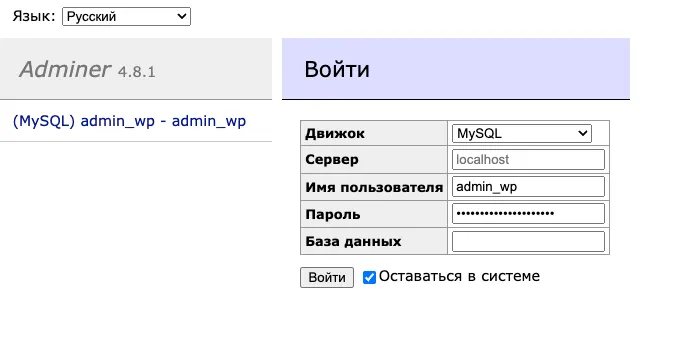
On the login page enter:
- System — the database type: MySQL, PostgreSQL and so on;
- Server —
localhost, or the name of the database container if Adminer runs in Docker; - the database Username and Password;
- Database — may be left empty to see all available ones.
Adminer does not allow logging in without a password. On Ubuntu the MySQL root user has no password by default and logs in through a socket, so create a separate user with a password.
Useful tips
- Export. The Export link in the left column dumps a database or selected tables. For large databases,
mysqldumpfrom the shell is more reliable. - Import. The upload size is limited by the PHP settings
upload_max_filesizeandpost_max_size. - Search all tables. The database page has a field for searching the contents of every table at once.
Adminer or phpMyAdmin
| Adminer | phpMyAdmin | |
|---|---|---|
| Installation | one file | a directory with configuration |
| Database support | MySQL, PostgreSQL, SQLite and others | MySQL and MariaDB |
| Interface | minimal | more detailed |
Adminer is handy when you need a quick look at a database on a server and do not want to maintain another application.