
Telegram Notifications for SSH Logins on Your Server

If a stranger logs in to your server, you want to know right away, not when you read the logs later. A small script sends a Telegram message on every SSH login: who connected, from which address and when.
How it works
The PAM authentication system can run an arbitrary command when a session opens. We hook in a script that sends a message through the Telegram Bot API. No extra software is needed — only curl.
Step 1. Create a bot
- Open a chat with @BotFather in Telegram and send
/newbot. - Set the bot’s name and username. You receive a token like
123456789:AAH...— save it. - Open a chat with your new bot and send it any message.
Step 2. Find the chat ID
Run this on the server with your own token:
curl -s "https://api.telegram.org/bot<TOKEN>/getUpdates"Look for "chat":{"id":123456789 in the response — that is the chat ID. If the response is empty, send the bot another message and repeat the request.
To notify a team, add the bot to a group and use the group’s ID — it starts with a minus sign.
Step 3. Create the script
sudo nano /usr/local/bin/ssh-login-notify.sh#!/bin/bash
# Telegram notification for SSH logins. Started by PAM.
TOKEN="123456789:AAH..."
CHAT_ID="123456789"
# React only when a session opens
[ "$PAM_TYPE" = "open_session" ] || exit 0
TEXT="🔐 SSH login
Server: $(hostname)
User: ${PAM_USER}
Address: ${PAM_RHOST}
Time: $(date '+%Y-%m-%d %H:%M:%S')"
curl -s --max-time 10 \
--data-urlencode "chat_id=${CHAT_ID}" \
--data-urlencode "text=${TEXT}" \
"https://api.telegram.org/bot${TOKEN}/sendMessage" > /dev/null 2>&1 &
exit 0The script contains the bot token, so only root should be able to read it:
sudo chown root:root /usr/local/bin/ssh-login-notify.sh
sudo chmod 700 /usr/local/bin/ssh-login-notify.sh
Two details matter for reliability:
- the request runs in the background (
&) with a 10-second limit, so logins are not slowed down even if Telegram is unreachable; - the script always exits with code
0, so a failed send never blocks a login.
Step 4. Hook the script into PAM
Append a line to /etc/pam.d/sshd:
echo "session optional pam_exec.so seteuid /usr/local/bin/ssh-login-notify.sh" | sudo tee -a /etc/pam.d/sshdoptional means a script failure does not block the login. The /etc/pam.d/sshd file exists on both Debian/Ubuntu and AlmaLinux/Rocky Linux, so the method works the same way everywhere.
Step 5. Test
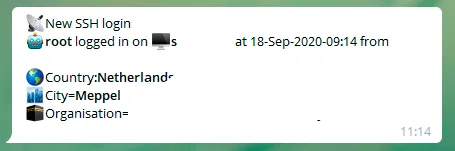
Open a new SSH connection to the server. A message arrives in Telegram within a couple of seconds:
If nothing arrives, run the script by hand and look at the API response:
sudo PAM_TYPE=open_session PAM_USER=test PAM_RHOST=127.0.0.1 bash -x /usr/local/bin/ssh-login-notify.shThe usual causes are a typo in the token, a wrong chat ID, or not having messaged the bot first — a bot cannot start a conversation.
Skipping notifications for your own logins
To keep the script quiet for trusted addresses, add a check after the PAM_TYPE line:
case "$PAM_RHOST" in
  198.51.100.7|10.0.0.*) exit 0 ;;
esac
What this method does not do
A notification reports a login; it does not prevent one. Use it alongside the basic protection for your server: key-based login, a non-default SSH port and Fail2Ban. The same bot can send high server load alerts.